2. Introduction
SimStm is a VHDL testbench designed to facilitate testing driven by external stimulus files with a “.stm” extension. This testbench is provided by Eccelerators GmbH and aims to simplify test script creation by introducing the SimStm language. Eccelerators GmbH provides IDE support for this language through Visual Studio Code and Eclipse by SimStm plugins; visit Eccelerators. The full power of SimStm is achieved together with the HxS tool of Eccelerators GmbH since all necessary SimStm code for the HW/SW interfaces is generated by HxS.
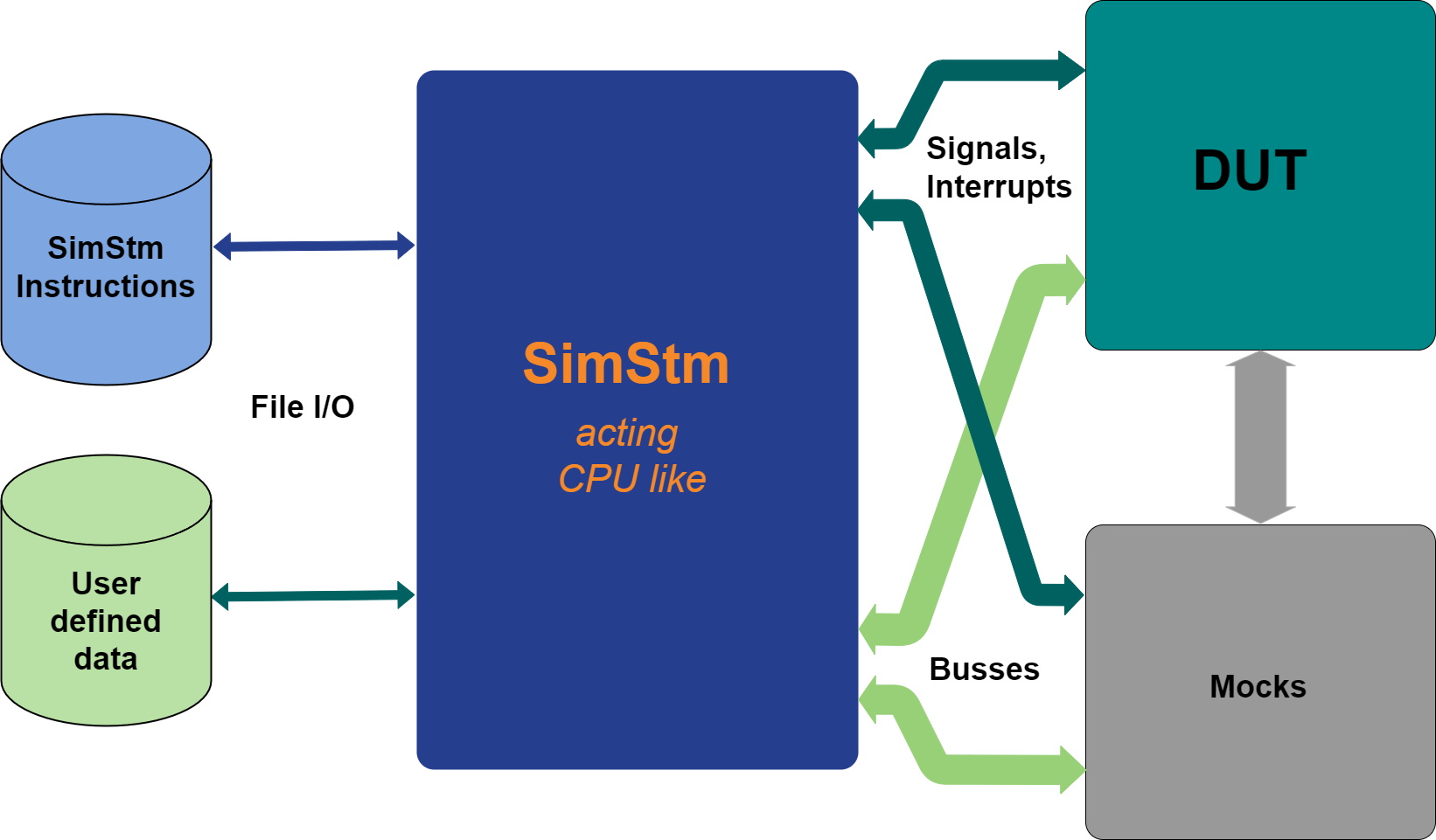
simstm-basic
2.1. History and License
The original VHDL testbench was coded by Ken Campbell; visit GitHub. Therefore, the SimStm repository is forked from this original. The complete VHDL source code of the SimStm VHDL testbench is distributed under the same license as the original. However, Eccelerators GmbH has substantially repartitioned and changed the code. The original copyright notice has been retained within all source files related to the original.
The IDE plugins are available for free on the Eccelerators GmbH web page. They may also be available for free on the respective IDE marketplaces once deployed. The source code of the SimStm language IDE plugins is property of Eccelerators GmbH and is closed source.
2.2. Focus
It is common practice to use the file I/O features of VHDL for VHDL testbenches. Typically, each developer creates their own format for commands in an input stimuli text file, along with a unique file name and extension. The command set is focused on the tasks currently being solved.
The general advantage of this technique is that the VHDL code of the testbench doesn’t need to be changed and recompiled for different stimuli command sets. Different command set files can be presented to the VHDL testbench, or command files can be interactively changed during debugging.
While the advantage of not having to recompile the VHDL testbench has decreased due to increased computer and tool performance, a major part of the advantage remains valid for reusability and having a first decoupled level of abstraction for stimuli above the VHDL code.
This is particularly applicable to CPUs attached or integrated into components under development. For example, an IP such as an I2C-controller with a HW/SW interface can be tested with the same stimuli, whether attached to an AXI-bus in a SOC of the latest generation or to a plain microcontroller bus connected via copper on a PCB to an FPGA housing the I2C controller IP.
SimStm focuses on this purpose. It delivers a command set that is fixed and suitable for all needs in this context. The command set is defined by a domain-specific language that provides and controls all necessary keywords and object references, called the SimStm language. The commands are referred to as instructions.
The SimStm language is edited within respective IDE plugins for Eclipse or Visual Studio Code editors, supplying state-of-the-art coding support such as syntax highlighting, auto-completion, error detection, and more.
The user starts editing a top.stm file and as many child.stm
files as needed. The latter are included by include instructions,
which may be nested. Child.stm files can be used in a library manner
for reuse.
The SimStm instructions are purposely very close to HW to avoid debugging through too much overhead. All objects declared, such as variables, constants, arrays, implicit labels, etc., are global within one SimStm project. All objects representing values consider the values to be unsigned integer values. The values are 64-bit wide by default but can be customized to be any width by setting the machine_value_width generic when instanciating the tb_simstm top entity, individually for each instance.
The SimStm testbench presents a bus and a signal package source file to the user. These packages can be customized by the user to add buses, signals, or interrupts to the testbench. All other files shall be used unchanged. Eccelerator samples for Wishbone, Avalon, and AXI4lite buses for single read/write accesses are already included.
The primary focus of SimStm is to have a functional verification of all connected IPs via multiple buses with high coverage in a short time. It is not prepared to be used to verify the different conditions and sequences of accesses to the buses like other testbenches. However, it could control these testbenches via respective bus adapters. Eccelerators uses its own HxS tool to design and generate HW/SW interfaces. The patterns used by the generators are verified to work with all circumstances happening on the supported buses all the way to having counterparts in other asynchronous clock domains. The generated instances do not have to be verified again at this depth.
The SimStm language can be transpiled into Python, C, and other programming languages to use the code written in SimStm for a first test of a target HW. Thus, a functional coverage test is achieved very fast when the real target HW arrives. The transport and isolation of problems from the real application to the simulation environment and vice versa are simplified. Interaction between SW and HW developers is simplified too since SW developers can work with SimStm code rather than VHDL.
2.3. Features and Advantages
Compact and lightweight
Pure VHDL 2008, no use of a vendor-specific simulator interface
Easy to debug within any simulator, instructions close to HW
Abstraction of test code by SimStm language
State-of-the-art SimStm language IDE support for rapid test case creation
Test case code change and test without re-compilation
SimStm language will transpile to Python or C, thus simulation code can be reused for the test of real target HW
Easily customizable to support user-defined buses, signals, and interrupts
Standard buses Axi4Lite, Avalon, Wishbone and direct synchronous RAM are included
High coverage of functional verification of all connected IPs via multiple buses
Supports JUnit test reports
2.4. Contributions and Bugs
Eccelerators accepts GitHub pull requests, GitHub issues, or an email to
trigger a bug fix. Reported issues with samples cut down to reproduce a
bug are highly appreciated. In the case of email, please send it to
support@eccelerators.com.
Eccelerators may accept pull requests for small improvements.
2.5. Change Log
Release 3.x.x SimStm testbench: - New namespace, label, and call label instructions (procedures as call parameters) - Procedures can have parameters; old style procedures removed - Major VHDL refactor for readability, maintainability, and speed
Release 3.x.x IDE plug-in: - Eclipse and VS Code plugins available (validation is minimal)
Release 2.x.x SimStm testbench: - Removed “$” prefixes - Variables can be initialized with constants regardless of order - Local variables in procedures - Procedures can have parameters
Release 2.x.x IDE plug-in: - Eclipse plugin validation is minimal - VS Code plugin not yet built